In the Madad app
Construction tools on your phone: spirit level, plumb bob, laser line, area calculator and paint visualizer
The site kit on your phone, from its sensors and camera: for levelling and measuring, colors and paint, and light, sound and vibration. Their readings attach to your project notes.
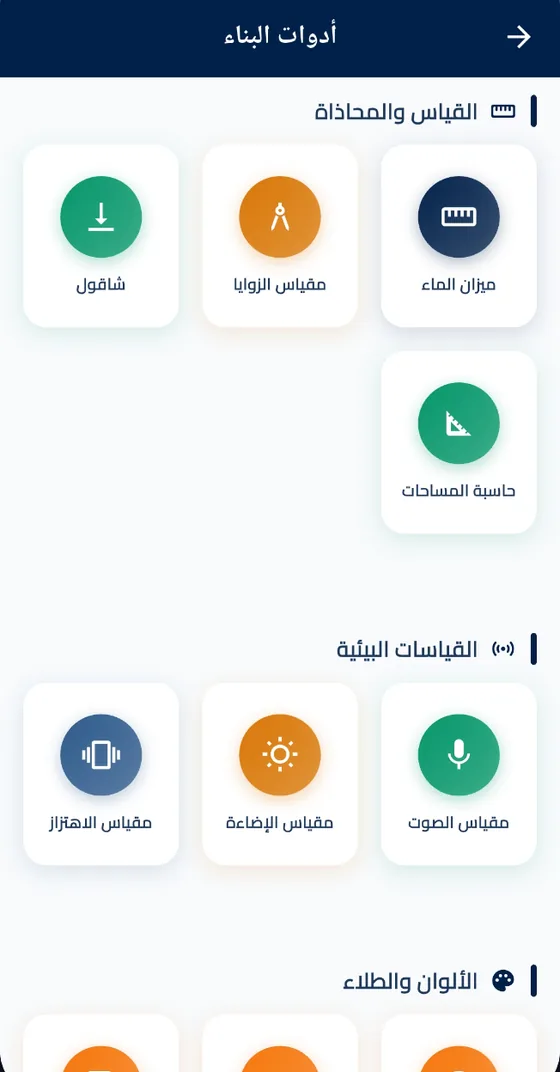
What is in Construction Tools
- Measuring and levelling Spirit level, a camera plumb bob, protractor, laser line — a horizontal line, and a vertical one if you like, over the camera image that you capture as a photo — and an area calculator for rectangles, triangles and rooms.
- Colors and paint Color picker from the camera or a photo, color blender with shades between two colors whose codes you copy, and a paint visualizer: tap the wall in its photo and it is painted.
- Environment Sound meter with the microphone, light meter with the camera, and vibration meter.
- Unit converter Length, area (including dunam), volume, weight and temperature.
- Augmented reality "AR Tape Measure" and "AR Paint Visualizer" on the wall itself through the camera — on Android, on a phone that supports ARCore.
 Open Construction Tools in the Madad app
One app for the market and its services, free.
Android and iPhone
Get the app — free
Before you start
- Their readings are estimates from your phone sensors and camera, not calibrated instruments: where accuracy matters for safety or structure, check with proper tools.
- The augmented reality tools are Android-only, need ARCore and may not work on some devices.
- The tools are free and need no account.
Questions
Can I rely on the phone spirit level?
For a quick estimate on site, yes. Where accuracy matters for structure or safety, check with a calibrated level.
How do I try a paint color before buying it?
Photograph your wall and tap it in the Paint Visualizer to paint it in the color you choose, or try it on the wall itself through the camera in the AR Paint Visualizer on Android.
How big is my room?
In the Area Calculator you choose a room and type its dimensions, and in the Unit Converter you convert between area units, dunam included.
Also in the app
Request transport
A tipper, flatbed or crane truck for building materials, with price offers from Madad.
Request a workshop
Painting, tiling or electrics: offers from the workshops of that craft in your governorate.
Projects
The materials and workshops of your apartment in a project your contractor and owner share.